1. Ensure that your monitor has built-in speakers. You can check it on Product's website page -> Specification -> Audio.

2. Check the cable connection:
a. Make sure the connection is secured.
b. Re-plug or try another HDMI (Premium) certificated cable in direct connection.
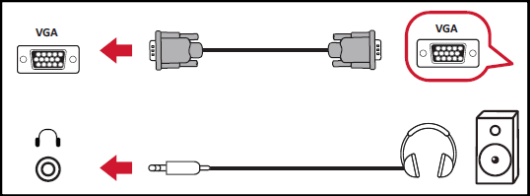
c. If using a VGA cable, ensure the audio cable is connected to the AUDIO/LINE/HEADPHONE OUT port on your device and plugged into the AUDIO/LINE IN port of the monitor.
3. Check and make sure the monitor is not muted or volumed down.


4. Check the PC/laptop setting:
a. Make sure the PC/laptop is not muted or volume down.

b. Check the setting of sound output device in Windows/Mac OS has been set to monitor.
